
Here is a nifty solution designed to populate a google map with geo location markers and infowindow popup boxes.
First you’ll need to get a Google Maps API developer key.
Then we need to prep the data — we need a csv table with a title, content, latitude and longtitude values:
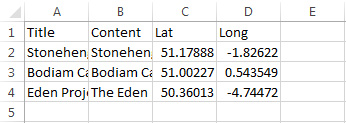
If you open the file with a text editor it will look like this:
Title,Content,Lat,Long
Stonehenge,Stonehenge is a prehistoric monument located in Wiltshire,51.1788823,-1.8262155
Bodiam Castle,Bodiam Castle is a 14th-century moated castle near Robertsbridge in East Sussex,51.002266,0.543549
Eden Project,The Eden Project is an artificial biodome visitor attraction in Cornwall,50.3601344,-4.7447178
Next we need the code that will read the csv file line by line and generate the javascript to feed the data to Google Maps API: https://drive.google.com/folderview?id=0B3bO_ZNaxxnlc2FiLWxfbTZCeFU&usp=sharing
<?php
$data = file_get_contents('google_map_data.csv');
$api_key = 'your key here';
$lines = explode("\n",$data);

foreach ($lines as $key => $value){
	if ($key>0&&strlen($value)>20){ // skip csv header row and blank rows
		$line = explode(",",$value);
		$markers[$key] = trim($line[0]).','.trim($line[1]).','.trim($line[2]).','.trim($line[3]); // title,content,lat,long
	}
}
?>
<!DOCTYPE html>
<html>
  <head>
    <style type="text/css">
      html, body, #map-canvas { height: 100%; margin: 0; padding: 0;}
    </style>
    <script type="text/javascript"
      src="https://maps.googleapis.com/maps/api/js?key=<?=$api_key?>">
    </script>
    <script type="text/javascript">
		var map;
		var marker = {};
		function initialize() {
			var mapOptions = {
			center: { lat: 51.1788823, lng: -1.8262155},
			zoom: 5
		};
		map = new google.maps.Map(document.getElementById('map-canvas'),mapOptions);
		var markers = [];
		<?php
			$counter = 0;
			foreach ($markers as $index => $list){
				   $marker_details = explode(',',$list);
				   echo 'markers["m'.($index-1).'"] = {};'."\n";
				   echo "markers['m".($index-1)."'].lat = '".$marker_details[2]."';\n";
				   echo "markers['m".($index-1)."'].lon = '".$marker_details[3]."';\n";
				   echo "markers['m".($index-1)."'].name = '".$marker_details[0]."';\n";
				   echo "markers['m".($index-1)."'].content = '".$marker_details[1]."';\n";
				   $counter++;
		   }
		?>
		var totalMarkers = <?=$counter?>;
		var i = 0;
		var infowindow;
		var contentString;
		for (var i = 0; i<totalMarkers; i++){

			contentString = '<div class="content">'+
				  '<h1 class="firstHeading">'+markers['m'+i].name+'</h1>'+
				  '<div class="bodyContent">'+
				  '<p>'+markers['m'+i].content+'</p>'+
				  '</div>'+
				  '</div>';


			infowindow = new google.maps.InfoWindow({
				  content: contentString
			});

			marker['c'+i] = new google.maps.Marker({
					position: new google.maps.LatLng(markers['m'+i].lat,markers['m'+i].lon),
					map: map,
					title: markers['m'+i].name,
					infowindow: infowindow
			  });
			//console.log(markers['m'+i].lat+','+markers['m'+i].lon);
			google.maps.event.addListener(marker['c'+i], 'click', function() {
					for (var key in marker){
						marker[key].infowindow.close();
					}
					this.infowindow.open(map, this);

			});
		}

      }
	  function panMap(la,lo){
			map.panTo(new google.maps.LatLng(la,lo));

	  }
	  function openMarker(mName){
		  //console.log(marker);
		  for (var key in marker){
			  marker[key].infowindow.close();
		  }
		  for (var key in marker){

			if (marker[key].title.search(mName) != -1){
				marker[key].infowindow.open(map,marker[key]);
			}
		  }
	  }
      google.maps.event.addDomListener(window, 'load', initialize);
    </script>
  </head>
  <body>
<div id="map-canvas"></div>
  </body>
</html>
Thats it, when you run the php file you will be presented with a google map that can be embedded using an iframe tag.
Here is an example of the Kwik Fit location markers placed on a Google map
You can extend the script with custom icons by adding another column to the csv file with the icon file path and adding an “icon:markers[‘m’+i].icon” option to the google.maps.Marker function.
Hi, this is a good example, however when i tried it out i receive an error when i launch the website
The error is:
This page didn’t load Google Maps correctly. See the JavaScript console for technical details.
How can I fix this?
Hi, I have managed to fix my inital problem
My next problem is how am I supposed to change the marker icon? What you have mentioned, is not working. Am I supposed to add anything else?
Please look up the google’s api documentation for more info on markers
Just wanted to thank you for keeping this post here with good links!
I have found it perfect for a sandbox except one thing:
where in the code do I place the string for a custom icon?
“icon:markers[‘m’+i].icon” where exactly does that go?
What should I name the header in the csv for that?
Appreciate it!